

South Africa eSIM
- 4G/5G
- No roaming fees
- MTN network
Free delivery: 2 to 10 days in the EUInstant delivery
Check coverage in South Africa

The South Africa eSIM runs on MTN, with 4G/5G where the network offers it. Switch on data roaming when you land.
Covered cities include Johannesburg, Cape Town, Durban, Pretoria, Gqeberha (Port Elizabeth), Bloemfontein, East London and Mbombela (Nelspruit). Elsewhere it works wherever MTN has signal.
In national parks and mountain areas, masts are few and far between, so expect long stretches with no signal on any network. Download offline maps and your bookings before game drives and hikes.
- Fair refund policyHow refunds work
- Friendly support staffChat with us
- Secure paymentEncrypted checkout

Quick answers
Will it work on my phone?Most eSIM phones
It works on eSIM-compatible iPhone and Android phones. Your phone must also be unlocked. Our compatibility check tests your phone in a few seconds.
When does my plan start?When it connects
On your chosen activation date, we’ll send you an email with the actual eSIM QR code. The data plan itself only starts when data roaming is switched on and the eSIM connects to a network.
Can I use it as a hotspot?Yes, no daily cap
Yes. You can share all your data with your laptop or another device. Sharing isn't slowed down and has no daily cap.
eSIM Activation Made Easy
- Receive Your Activation LinkAfter purchasing your South Africa eSIM, you'll receive an email within an hour. This email includes a QR code and a direct link to our activation page. If you can’t scan the QR code, simply click the link.Important: This QR code and link are not your eSIM but your access to book your activation.
- Book Your ActivationClick the link or scan the QR code to open the activation page. The SIM code is pre-filled, so you only need to enter your personal details and choose your activation date.Tip: It’s important to book your activation as soon as you receive the QR code and link to avoid any delays.
Land. Turn on roaming. Get online.

Countries covered
Browse 0 countries
Every plan works in all 0 countries. Tap a country to see its own eSIM.
Before you buy
Let’s check your phone
Good to know
Why choose a travSIM South Africa eSIM?

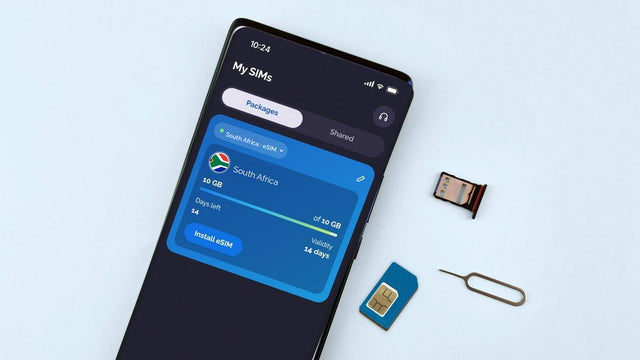
Coming soon: Install it in the app, in a few taps
- See your data and days left at a glance
- Install before you fly. The plan starts when you connect in South Africa.
Prepaid, no roaming bills
Pay for your plan up front. No roaming fees with us.
- From R 493.00, paid once
- No subscription, no automatic renewal
- Buy 2 or more: 10% off
24/7 chat support
A German company since 2014. Chat with us any time.
- travSIM GmbH, Brandenburg an der Havel, Germany
- Fair refund policy
- Quick answers in our FAQ
Prices and plans
Plans at a glance
3 plans · 10 GB to 25 GB · from R 493.00
Compare all 3 plans
| Data | Valid for | Price | Per GB | Choose |
|---|---|---|---|---|
| 10 GB14 daysLowest per GB | 14 days | R 493.00R 49.30 per GB | R 49.30 | Choose: 10 GB, 14 days |
| 20 GB14 daysLowest per GB | 14 days | R 591.00R 29.55 per GB | R 29.55 | Choose: 20 GB, 14 days |
| 25 GB30 daysLowest per GB | 30 days | R 690.00R 27.60 per GB | R 27.60 | Choose: 25 GB, 30 days |
Prices are per eSIM.
How much data do I need?
Start with your own phone. Its settings show how much mobile data you used last month, and which apps used it. Then allow for how you plan to use your phone on the trip.
 Maps and navigation (for example Google Maps)about 6 to 12 MB an hour
 Social media (for example Facebook)about 60 to 120 MB an hour, more with videos
 Video calls (for example WhatsApp), depending on app and qualityabout 90 MB to 1.4 GB an hour
 Streaming (for example Netflix)about 0.3 GB an hour on low quality, up to 3 GB in HD


Check the days too: a 7-day plan does not cover a 14-day trip, even with enough data.
Download maps, films and app updates on Wi-Fi before you go. Share all your data through your phone’s hotspot. Sharing isn’t slowed down and has no daily cap.
Estimates are examples from EE and Netflix guidance (October 2026). Apps and settings change how much you use.
Made for South Africa
For holidays and business trips
- Data only, 10 GB to 25 GB, for 14 or 30 days
- 4G/5G on MTN, where the network offers it
- Running low? Recharge the same eSIM
- For Cape Town, Johannesburg, Durban and Pretoria

 Cape Town


Product information
Details
Description
South Africa eSIM: mobile data for your trip
Whether you land in Johannesburg or Cape Town, the travSIM South Africa eSIM sorts out your mobile data before you leave home. You buy it online, book your activation date and install it before you fly. Turn on data roaming when you land and let family know you've arrived safely. Then get straight to maps, banking apps, hotel bookings, ride-hailing, translation and food delivery apps. It runs on MTN, one network for the whole trip.
Call home on WhatsApp and FaceTime from South Africa
Staying in touch works the way it does at home. Call and video chat with family and friends over WhatsApp, FaceTime, Zoom or Teams, send voice notes and share photos as they happen, all on your eSIM data. Your home SIM stays in your phone alongside it, so friends keep reaching you on your usual WhatsApp number. The travel eSIM has no phone number of its own, and you don't need one for WhatsApp.
Prepaid eSIM for South Africa with no roaming fees
The South Africa eSIM is prepaid. You pay one fixed price up front and won't find surprises on your phone bill when you get back. Pick the plan that fits your trip: Table Mountain, the Cape Winelands, Durban's beaches. Meetings in Sandton or a conference in Cape Town? The smaller plans keep email, Teams calls and maps running on a short business trip, and bigger ones make sense if you're on video calls every day. Staying longer? The 25 GB plan runs for 30 days. Every plan uses fast 4G/5G where the network offers it. Running low? Recharge the same eSIM instead of buying a new one.
Features
Technical Specs
Reviews
What travellers say
Product reviews
Reviews can’t be shown right now. Please reload the page.
Need more info?
FAQs about our South Africa eSIM products.
Everything you need to know about the South Africa eSIM, grouped so you can find the right answer faster.
Can I make calls with the South Africa eSIM?
Does the eSIM for South Africa come with a phone number?
Can I share data with my laptop through a hotspot?
How long is the South Africa eSIM valid?
Which network does the eSIM for South Africa use?
What if I need a South African phone number?
Does it work in Cape Town, Johannesburg and Durban?
Does it work in Kruger National Park?
Can I recharge my South Africa eSIM?
How do I install the South Africa travel eSIM?
How do I activate my South Africa eSIM?
When do I receive my eSIM?
Can I keep using WhatsApp with my own number on the South Africa travel eSIM?
How do I check how much data is left on the South Africa eSIM?
Will my phone work with the eSIM for South Africa?
Plan ahead
Guides for your trip
-
 GuideWhich fits your phone, eSIM or SIM card?How an eSIM and a SIM card differ, and which one suits your phone and your trip.
Before you go
More for your trip
Our South Africa plans work in South Africa. Travelling on to Zambia, Malawi or Madagascar? They have their own plans.
-
 South Africa SIM cardfrom R 414.00For phones without eSIM
-
 Zambia eSIMfrom R 99.00For your trip to Zambia
-
 Madagascar eSIMfrom R 99.00For your trip to Madagascar


